Using Teams for synchronous virtual meetings
- We recommend using the Teams desktop app to host classes for full functionality over the web version.
- Download this VCC Quick Guide and Comparison of Teams and Zoom Features for full details on features with VCC license/settings
Watch our most recent workshop recording of teaching on Teams to be introduced to many features of Teams within VCC context: requires VCC login.
Getting Started
These links will help you get started using Teams for online course delivery:
- Microsoft Teams Essential Training (LinkedIn course, VCC login required)
- Successful Teams Meetings, Webinars and Events (LinkedIn course, VCC login required)
- Microsoft Teams meetings support (Microsoft)
- Do a test call to ensure audio/video is working before a meeting. (Microsoft)
- Share your Teams meeting link in Moodle (video, VCC Mediaspace)
- How to fix unverified user status (Gettysburg College)
Classroom Agreement and Recording Guidelines
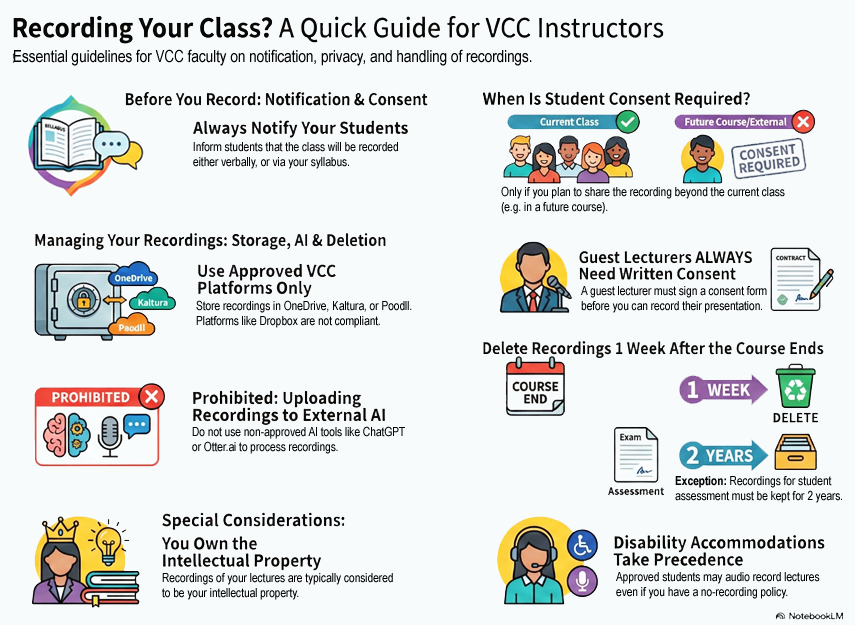
The following document and infographic describe VCC’s guidelines and policies around classroom recordings for instructors and students:
- Read our full Classroom Recording Guidelines (PDF)
Review all aspects of VCC’s recording guidelines and policies.